Showing posts with label tools. Show all posts

9/3/12

Show the Best and Brightest ME Contract

I always tell SD that she needs to try her best, not to look and compare herself to her friends or teacher or anything. Just herself. We are not comparing her work to her classmates' when she brings it home nor are we thinking of what the experts say she should be able to do at her age level.

We are looking at what she was doing last year and at the beginning of this year. We encourage her to learn, grow, and do better each and every year.

...embed no longer available...

So, on this paper she is promising to bring home 'good school papers.' The most important part of her promise statement though is that each paper should 'show the BEST and BRIGHTEST ME.'

We want her to be proud of herself, her work, and everything she does. We want her to think of this while she is at school, not just at home or when we are talking to her about it. So, my hope is that when she is at school she will think of this paper and be excited to come home and write in many new numbers for all the great assignments she brings home.

I left the numbers blank so that she can fill them in herself. A way for her to practice her handwriting, number writing, counting, and all the while becoming more and more proud of herself and her accomplishments.

When creating one of these contracts for your child, always:
  1. Encourage them to be them. Make sure they understand that you just want them to be proud of what they can do. They are very important, and they need to feel that way.
  2. Explain or show what is expected. Clearly identify what you mean by being their BEST. Show them work samples that they did in the past that illustrate their BEST work.
  3. Allow lots of participation for the child. Like how I allowed space for SD to add in her own numbers as she brings home good assignments. Hang it on the fridge and allow them to show it off when it begins filling up.
  4. Make sure they understand every word in the promise. I know SD may not fully understand the words 'promise' or 'brightest', and I could have used 'smartest' instead of 'brightest.' However I chose not to because I like to allow ample opportunities each day for her to grow her vocabulary. Don't underestimate what your kids can learn. Also, using the analogy of the word 'brightest' to a light bulb, SD can visually imagine herself glowing rather than stuffed into a book ('smartest').
What ways do you use to help your kids succeed in school?

Remember to subscribe to my blog so you can always receive my updates in your email or reader.

3/6/09

Life and GPTs

I like the extra money I am getting in from Cash Crate and Deal Barbie Pays. Free money is always fun, especially when it does not take a rocket scientist to earn it. LOL. Such simple, quick, and easy work is... well... simple, quick and easy to earn FREE money. Who wouldn't love that?

Anyways, the point of this post, is that I am needing to find a balance. Since finding Deal Barbie Pays on March 2nd and still wanting to stick with Cash Crate to boost my profits this month, I am really becoming more and more bogged down. Not with completing offers or anything, but just everything involved along with it (blogging, promoting, helping referrals, and of course my family and offline life).

So many commitments, and so little time in the day to get everything done.

Of course, my family and myself comes first. If my son needs me, I am here and I will be with him for as long as necessary or wanted. I play with him throughout the day (when he wants to, funny how independent 14 month olds get). I cook and eat meals... And if I need to run a few errands or have appointments on a day, well of course those cannot be neglected.

Next comes my emails and helping referrals (sometimes comes in emails). Even if I don't have time or energy to get offers done myself, helping my downline will still help me flourish. I also don't mind helping anyone that has a question (even if they are not my referral), because good karma and a good reputation are always great things to send out to the Universe. Good things will always come back.

When all that is said and done, then I can have time to complete offers for myself (usually during the baby's first nap or after he goes to bed until midnight or later). Completing offers for me is a task to be done with complete focus. I find that offers confirm better and faster that way. I clean my computer, history, recycle bin, run CCleaner, and everything. I close all programs, maybe even restart my computer to start from scratch. My disk defrag is run weekly at the same time to keep my computer running smoothly.

Anyways, then I open one browser (maybe IE) and open my GMail and any other email program I need to check during the process. Then I open an alternate browser (like Firefox) and will use that browser for the GPT site I will complete offers on (Cash Crate or Deal Barbie Pays currently). I only do one at a time, and I alternate which browser is for emails or the GPT site. (So, the next time around Firefox would be my emails, and IE would be the GPT sites.) I also alternate which site I start with as well, and if I find one to not be confirming currently, I will switch to the other until something starts happening.

Oh and of course, lastly after all that, if I have time, is my blogging, which kind of counts as my referral support, but is still entirely on its own. Then I have to also promote it all in some way to get any kind of feedback. Just having this blog means nothing. It's not going to drive its own traffic here. Just think... how did you get here? I posted something on Twitter about it, you viewed any number of my profiles with it linked there, a traffic referral site, a forum posting I made with a link here, or a message I sent you when you asked for my tips... etc. The rarest form lately is people coming from search engines. However I have noticed an increase in traffic from searches, but that always takes time and thought when writing my posts.

All of it takes time, energy and effort. And as much as I want to spend working on offers or working on blogging (because those are my two favorite things), I still have to focus some effort on the other things to make it all worth while. So, if you have an advice for me, please feel free to leave it in the comments below or email me.

I also love to hear if you found something very useful on here. Feel free to comment, email, or let me know if I was helpful. I also take testimonials for my websites. *grin* Hey karma can be advertised for. *wink*

2/1/09

10 Tips to Help You Get Started Earning Money Online Fast with Cash Crate

Yes, it's true. I finally cracked last night and began using Cash Crate to make some money online. I was reading an article on Work At Home Mom Revolution which directed me to Frugal Dad's post for Side Hustles To Keep Your Family Finances Afloat. He has some really great ideas, but some that would not work for me right now. However I grew more curious about other information he gave out on his blog and ended up stumbling across this post about Cash Crate being legit and how much he actually earned himself! He even included a photo of his last check for $203.22!

[For my loyal readers and friends, please click on one of my banners or visit Cash Crate.com if you are interested in joining Cash Crate for yourself. That would help me out greatly. Much appreciated :) ]


I know I had tried doing Cash Crate years ago, however I ended up not making it to the minimum (which was $10) and just became bored of the whole task. Now the minimum payout is up to $20, but I am still going to test it out.
Get Paid To Do Free Offers!
Mostly because Frugal Dad included some helpful tips on how to get started with Cash Crate to earn money in your first month, and then I also did some research and found many other helpful hints, tips, and tricks to help you earn money the fastest using Cash Crate and with only an hour of commitment a day!


Here is a summary of the tips I have discovered, and am using myself:
  1. Create a "spam" email account. Instead of using any email account that you actually look at, I suggest creating a free one that you supply to the offers. Supposedly you can use a different email address than the one you specify to Cash Crate, I'm still not sure on that. So, I created one that everything Cash Crate is directed to. I used Gmail to do so, and I applied a filter to all Cash Crate incoming emails to be forwarded to an email I do check since those are the only emails I will care to read.
  2. Create a "spam" voice mail number. Yes, I was stoked to find this tip. Go to simplevoicebox.com or grandcentral.com (I used Simple Voice Box), and you can set up a free number that you can direct the offers to instead of one of your personal real phone numbers. The number is simply a voice mailbox that you customize, and can check (if you want). Voila. No spam phone calls!
  3. Sign up for the Do Not Call list. I had already done a few offers before I found the tip about a free number, so I placed the number I was using onto the Do Not Call list in hopes that these offers will be deterred.
  4. Do NOT use a fake address when completing offers. You are required by Cash Crate to provide each offer with valid information, therefore if you give a fake address you may get deleted by Cash Crate or not credited your money. Also, all the information you provide to Cash Crate directly when registering should be accurate, because they send you real checks. Giving them a false name or address will make it impossible to receive and cash these checks.
  5. Complete the 100% free offers. After registering, go to the “Complete Offers” menu, select “100% Free” from the “Show:” drop down menu filter. These surveys don’t pay as much, but they are typically shorter and do not require a credit card to participate. These are the only offers I am going to complete. Also, sort them by 'Rating' instead of by 'Payout', because you will receive credit for the money earned from those with higher ratings faster.
  6. Download and use Robo Form. This quick, easy, and free program installs a toolbar in your web browser, and it allows you to save profile information for things like surveys. Then with the click of a button, Robo Form will fill in required information as you have specified. Check out this video I found that shows you how to get started with Cash Crate, and has a little tid bit about Robo Form.
  7. Clear your cookies before and after each offer. This will allow you to do the multiple offers, and will make it easier for Cash Crate to confirm your offers quicker. Thus changing your pending money into earned money faster! In FireFox or Flock, you can do this by going to "Tools", "Clear Private Data...", and then unselect all the boxes and only check the one for "Cookies." Then click "Clear Private Data Now."
  8. Hit "No" to any and all of the special offers. You do have to submit your information to the first form as indicated by Cash Crate. However after that there will be literally dozens of "special offers" that pop up on many screens after (I don't mean pop ups). This is the most time consuming part of the whole process, and this is where Robo Form comes in handy a great deal. Even if it pops up saying you must say 'yes' to at least one offer, say 'yes' and then on the next page look for a "Skip" or "No thanks" and select that. Do NOT submit your information to any other offers except the first one required by Cash Crate. For help understanding what I am talking about, check out the video I mentioned earlier and around minute 4:00 he actually walks you through completing an offer.
  9. You can hit Alt-= to fill in all NO's. When you have a page where there is a list of offers and you have to select 'yes' or 'no' to all of them (always choose no, and yes for only one if required), simply hold down Alt and hit the = key and this will fill in all the No's for you. ;) Pretty cool, huh?
  10. On the final page, click on at least 2 offers, let the pages load, and then you're done. At the end of nearly every survey will be a page saying something like "Final Steps: Please complete at least 2 of the offers below." Simply click on two of the offers (usually pictures linking to the site), and let the pages load completely to make them think you visited there. Then close out of all the windows/tabs until you are back at the Cash Crate offers menu. Find the offer you just completed, and hit submit. Once it shows a banner saying it was submitted, clear your cookies like I said in #7. Voila, one offer done and pending. (Also, once you delete your cookies, you will be logged out of Cash Crate, kind of a pain, but simply reload the page and log back in. If you have Robo Form installed, it will save your log in info for you.)
Currently I have $6.30 earned in my Cash Crate account and $24.15 pending, and that was only from signing up late last night. Also, this is the first of the month, so I have 27 more days to earn at least $13.70! I have high hopes that I will be receiving a check around March 15th. LOL. 

Get Paid To Do Free Offers!
Do you use Cash Crate? Did you have a good experience or a bad experience? If you have any other tips or tricks, please share below. Did you find one of my tips helpful? If you have any comments, questions, or concerns, feel free to post a comment below or email me at mel [dot] bail [dot] mama [at] gmail [dot] com.

1/29/09

I Had a Small Heart Attack Today

Ok, first let me say, it wasn't a real heart attack. My health is fine.

However, I almost wasn't when I was looking through the multitude of pictures on my camera's memory card and instead of only deleting one picture, I accidentally deleted them ALL!

Yes, ALL, everything, 100 percent.... AHHHH!!! And of course because I am such a procrasitinator, just guess what pictures were also still on the memory card. Go on, just guess.... What major family holiday just took place? That's right, Christmas. My son's first Christmas (that we took pics and he opened his own presents)!

I died when I saw the "Deleting 100 files" pop up on my screen. What?! 100?! No, I just wanted to delete one, not all of them. I cant remember the exact number, but there were a lot of photos and videos on there.

*Breathe Breathe* There has to be a way to fix this, right? *Sob*

Ok, so dramatics over, one quick search on Google and up pops an eHow article (I love that site) about How to Restore Deleted Files From a Memory Card. Oh perfect, I hope.

Can you believe it actually worked?! Yes, one simple program that you just simply have to download (no installation needed) can restore just about any deleted files on hard drives, memory cards, etc. Terrific. And it isn't even a new program! But it's free!

So, what program is it? Well, if you haven't scooted over to the eHow article yet, I will tell you: It is Restoration available through Snapfiles.

If this has happened to you or especially if it happens often, I recommend downloading this program. I have done so, and have found no bugs or viruses. It also works well with Windows Vista.

Try using this before you do a system restore, because if you do that instead then your files may be lost forever.

Has this ever happened to you? Were you able to get your files back? Or would this program have come in handy?

1/15/09

My Own Reading Program for a One Year Old

As I type, I have been in the midst of working on my very own version of how to teach my son to read. I have seen the infomercial for "Your Baby Can Read" and was astounded to find out how big of a trend this is. They have a system and it does seem to work on so many babies ages 3 months to 3 years.

I also found so many sites dedicated to Dolch words for beginner readers, word card suggestions, even a short article by Gwynne Spencer about how she taught her son to read using manicure scissors at 3 years old!

Then that got me thinking, 'If Gwynne created her own method that encouraged her son at 3, why can't I create my own method for my son at 1?' He is already interested in learning so many new things, like sign language, new foods, new places, etc. He is an open book for me to write LOL.

So, here I am, ready and willing to get started, and my first step was to identify the words I wanted to teach him. I was reading this article on eHow.com where they suggest to make 100-200 word cards and show them to your baby 3 times a day for no more than 30 seconds each. How you do it is by showing one new word a day until you get to 5 words, then retire the first word, etc etc. For more details, please go read the article, it is very informative.

I decided to identify my own 100+ words that I would like to teach my son. I started with his body and his environment. Mostly words that are easy for me to show him.

As I got over 100 words, I began thinking of an idea I had when I was younger... I wanted to write words on name cards for objects around the house and then tape them to each object, like what they do in preschools. I did this for a short while with my step daughter, however with many moves and all, the cards became torn or lost.

But that would be perfect to lead my son into the venture of reading. My goal is going to be to make these name cards again, and as I tape them up I will have my son with me. I will read the word, show him the object and then he can help or watch me tape it on (hopefully out of reach and for good, otherwise I will be replacing them often).

Then the everyday game I want to play is by making index cards with the words of the objects on them. I will show him a card, read it off, and then go show him the object. Eventually I want him to be able to run around and show me the objects as I show him the card. I have no goal for a length of time for him to learn, and I am taking a more direct approach than one word a day. I am going to treat it more like with sign language. I sign to him as often as I can.

I will do the same thing with the reading cards I make. Every time I say the word, I will show him the card (and probably sign as well). At this age, kids are sponges to information. Their brains are still developing and capable of taking in much more information than most people give them credit for. My son was able to pick up on his routine in only 2 weeks, and then we moved and he still was accustomed to his routine in the new environment.

I have been astounded by my son's intelligence and I really want to give him more credit than I have been. No more am I going to think, 'oh no he is too young for that,' because he can never be too young to be exposed to the real world and education.

Do you have any amazing teaching stories of your kids? Please share with us here. All links welcome! Videos of your kids being amazing would be great, too.

1/10/09

Chores Made Fair

Last night, I worked real hard on coming up with a chore list for the new apartment, so that hubby and I can keep up on all the in's and out's and keep this place looking spic and span. I didn't want it to be too complex and as fair as possible, so we alternated most chores and each had our own chores (i.e. he empties the cat box because I am pregnant and can't, while I pay the bills because I don't trust him too LOL).

Then I sat down with him (while he was playing one of his video games, so I didn't really have his full attention), and asked what he thought and if it was fair enough. I got a quick read through and an 'Uh hmm,' as if that was supposed to really give me the feedback I needed. Then I tried to ask if he thought I had forgotten anything, but the answer to that was a very simple and quick 'Nope.' But of course, after thinking for a few minutes and looking around the house some more, I had forgotten some things and proceeded to add them.

Then this morning, I woke really early (4:00 AM) and could not get back to sleep, so after some quick cleaning and toy pickup, I decided to do some Internet surfing. With the chore list still fresh in my mind from last night, I decided to read up on some household organization tips and such. Throughout my searching, I came across a wonderful review from Money Saving Pro about a unique and free website that helps organize family chore lists online! Hmm... that got my attention.

The website is called Chore Buster, and it is designed to help families or couples fairly assign the chores of the household. And yes it is 100% free. Although there are a few nice features that can be used if you donate to the site.

Even so, without paying anything, a user is able to enter the names of as many family members as they have, customize each member's chore settings (i.e. No chores on Sunday or 75% less chores for kids), and set a list of chores. This service is so helpful that it can email each member their chore lists on a weekly or even daily basis. Or you can simply print a master one out and hang it on the fridge for all.

It also lets you customize the frequency and desirability of each chore. Desirability? Yes, you can set things like pick up toys to 1 for easy and cleaning the bathroom to 6 for medium and then cleaning the gutters to 10 for extreme. You can also set certain chores as not being assigned to certain members, such as I won't let my daughter clean the cat boxes or the oven, and my hubby won't be paying the bills or folding/putting away the laundry (he can never tell who's is who's). Also, since I cannot clean the cat boxes because I am pregnant, that is all hubby's job.

You can also set rewards for each chore (dollar amounts only), and then there is a checklist that you can tally up the rewards for each person. I have this set for simple dollar amounts from $1 to $10 for each chore. Then instead of giving each person the exact amount they earned, I am using it as a percentage from our allowance fund. I am not sure about the nitty gritty just yet, but I will work it out once we get this more underway.

Some examples of my amounts are $1 for picking up and vacuuming a room, $2 for taking out the trash, $5 for cleaning the whole bathroom, and $10 for 'Surprise husband/wife with something nice.' (That last "chore" I found in the preset list, and just had to use it for us). That is another nice feature, you can search through a list of popular chores or look at other member's lists entirely. This helped me to find some things I was missing in my list.

Then after all that nitty gritty, Chore Buster will divide up the chores based on your settings for each (frequency, members, and desirability) so that each member will have a fair amount of 'points' for chores to do each day. *It even has an option to set a random quality for surprises.* The points are the ones you assign as desirability and difficulty. I set my daughter's chores to 75% less, because she is only 6 and has school. She also gets the weekends off from any chores.

You then have the option to create a chore list for 1, 2, or 3 weeks (and by member if you donate), and view it in web page, Word, or Excel form to print. There are many more unique and awesome features that are available if you donate to the site.

You can take a look at my chore schedule here, and sign up for your very own free account here. They have some advanced features, such as viewing chores via mobile or RSS feed, and also a dektop widget you can download. They also mention that soon they will be integrating Facebook with Chore Buster soon, so stay tuned on that.

Do you use Chore Buster? If so, what features do you like? If not, are you going to give it a go?

1/9/09

Baby Chaleco ~ Chic Baby Bibs

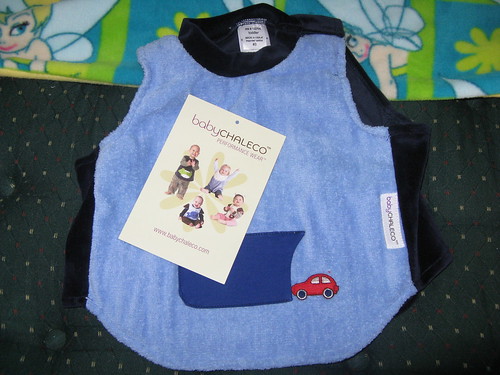
baby bibs
I was fortunate to be chosen to review one of the prized waterproof baby bibs from BabyChaleco.com. When I received my Baby Chaleco, I was thrilled with the stylish and fancy material used. It is paired so eloquently with the whimsical 'car into the tunnel' design, which by the way, that tunnel is a pocket. Not 100% functional for many things, but my son likes to find things himself, so I invented a fun game by hiding his spoon in there and he would try to do the same.

You could also stuff a wet nap in there for when they are finished eating to wipe down the baby's face. I know my son can never sit still while eating (especially at parties), so I would have to chase him all over, then pick him up, find my diaper bag, and struggle to get a wipe and wipe his face down. Having this simple little pocket saves me much running around.

The Baby Chaleco features an absorbent, poly-cotton blend on top, and a 100% nylon liner underneath. So, all the drool will get absorbed into the material and stay there without soaking the baby's clothes underneath.

Personally, I not only go through clothes like no one else, but also bibs, because my son will drool right through the bib and onto his clothes. I can never just put him in a cute outfit and have it stay that way for long. Or I have to cover that outfit up with a possibly, but most often not, matching bib. And let's face it, family parties/events always seem to happen right when baby is in the peak of cutting a tooth.

But let's be honest moms out there, after the age of 6 months, there are no outfits that you can buy in stores with matching bibs. Why is it only cute for an infant that can't even sit up to have a bib and outfit set? Plus those bibs are just for fashion, and barely large enough to cover their necks.

Other bibs with this same waterproof concept that I have found in stores are usually pull over kinds with no snaps or velcro. However the problem with those is that they are never snug enough to the neck and my son will drool underneath the bib anyways. So, they are just pointless. Also, my son tends to pull on bibs of any style, however with the Baby Chaleco it was just like another shirt. He didn't even realize he was wearing a bib, so he left it alone as if I had put a vest or sweater on him.

The Baby Chaleco's fit very snuggly (but not too snuggly lol) around the baby's neck with an easy-to-snap two button enclosure over one shoulder. This makes getting the bib on and off very easy because the neck and arm hole open to one wider opening. It also makes the bib what I would like to call "pull-proof." This feature also helps when the baby is done eating and covered in whatever he was eating, because you can lift it straight off of him instead of pulling it over his head, which usually causes food to get stuck in the hair or on the forehead.

The Baby Chaleco is very chic and stylish looking, and as long as my son is wearing blue/black jeans, khakis, or blue/black sweatpants (which is just about all the options he has), this bib matches all his outfits. The shirt matching is not at all an issue, because it wraps competely around him covering his entire shirt. The velvet material in back is a very fancy touch. I was able to show my son's new baby bib off at a recent family party for a very wealthy relative, and everyone was in awe at the style and craftiness of this bib. Well, that was after I told them it was a bib. They thought it looked like a little vest, but that's because it does! I can even leave him in the bib while he is running around and no one can tell the difference. He looks just as good as ever.

You would never know that he is wearing a baby bib it looks so good. I recommend this stylish baby bib for any mom with toddlers, because it is stylish yet affordable. And it will save you loads of hassle time during family parties.

Do you have a Baby Chaleco? What do you love about yours?
If not, would you want one? Why?

Visit their website to enter to win your very own Baby Chaleco.

12/29/08

16 Days of New Things ~ Day 13

This was supposed to be added into my previous post, but I will just give it it's own.

Did you know that you could freeze milk, eggs, and butter?

I didn't before, but I do now. I also know how to do it. Thanks to another great article I found on About.com here are some unusual foods that can be freezed.

Eggs

Mix the yolks and egg whites together, and pour into an ice cube tray. Two cubes are the equivalent of one large egg.

Milk

Store in its original container, but pour out enough milk to allow for expansion – approximately a cup per gallon of milk. Thaw in the refrigerator, and shake well before using.

Butter

Store in its original container. Thaw in the refrigerator to use.

Bananas

Freeze in peel. Then, simply thaw and peel to use in smoothies and breads. Note: the peel will turn black, but that won't effect the quality of the banana at all.

Celery

Wash and chop to desired size. Then, flash freeze on a tray, and transfer to a freezer bag or another air-tight container. To use: add the frozen celery directly to soups or other heated dishes.

Tomatoes

Wash thoroughly. Then, freeze whole and unpeeled on a tray. Transfer to freezer bags once fully frozen.

Fresh Herbs

Chop finely. Then, place in an ice cube tray along with a small amount of water. To use: simply drop frozen cubes directly into heated dishes.

Nuts

Freeze (either in shell or shelled) in a freezer bag or another air-tight container.

Zucchini and Other Squash

Wash and chop to desired size. Then, blanch for three minutes; allow to cool; and freeze in an air-tight container.

Apples

Freeze whole or chopped, peeled or unpeeled.


12/24/08

Santa Stationary

I just spent the better part of the last 2 hours scouring the Internet in search of a 100% customizable Santa letter and/or Santa stationary that I could print for free. (Yes, I am cheap.) The only reason I waited until now is because hubby wanted an extra special reminder to our 6 year old, who has not been the best of best lately (including bed time tonight).

She already had a call from Santa, and a visit to see him and take pictures. However I did agree that maybe if our words were not sinking in, perhaps a written (or printed) note from a higher up in her world would help us out.

The problem I ran into tonight is even though the letters are cute and you can personalize them, they are not customizable. They either mention going to bed early, leaving carrots and cookies out, or the letter she sent him. Well, she is already in bed and will be getting the letter tomorrow morning in her stocking, we already left everything out for Santa, and she did not send him a letter. So, I was hitting roadblock after roadblock.

Finally I decided instead of searching for an already made personalized Santa letter, I would just search for Santa stationary.

Bingo.

Oh but wait, the stupid companies put their watermarks and logos all over the stupid thing. Why? Seriously, why do you need to publicize yourself on an image that is meant to be read by a child? How far are these companies willing to go to sabotage our children's fragile minds?

Well, luckily for me, I said there is no way I am printing it like that. A quick copy-paste into Photoshop and a few patches later, voila...

Santa stationary


A beautiful ready to print and write on Santa stationary. All I had to do was save it and upload it into Word to create an 8.5 x 11 image to print and write on. (I like the more personalized touch of actual writing. Santa shouldn't be too far into this technology age. He's still riding in a sleigh!)

Feel free to download and save the image above. If it doesn't come out 100% perfect, and mine really did, then feel free to email me at mel.bail.mama {at} gmail {dot} com. I can send you the image or the saved Word document with the image already in it.

Good luck! And Happy Holidays to you and yours!

~Mel

12/18/08

16 Days of New Things ~ Day 4

Day 4 of '16 Days of New Things'

How are you liking things so far? If you are new, welcome, please RSVP below and add a comment about something you would like to share or something you just learned today.

Today's post will be short and sweet. I just wanted to share a website I found that I have been using on and off for a few weeks now, called Daily Mugshot.

Did you ever see the project from some guy about a year ago where he took a picture of himself in the same spot, same expression, and same time for a year? Then he played the pictures in a quick slideshow and you could literally see him progress throughout the days, weeks, and months.

Well, that is what Daily Mugshot can help you do for yourself. Check out my Mugshow below, and if you scroll your mouse over it, options will appear at the top to slow down the speed and even change the direction. I haven't been 100% consistent with it, but after a few years I am sure it will grow into something.


I also started one with my son. Although for myself I use a webcam, I cannot do that with him because he is way too squirmy. So, I use our digital camera and upload the pics. It takes about two seconds, and puts together nicely. His doesn't have as many as mine, because I lost out camera for a time and just found it today. But like I said, after a few years (maybe 10+ for him) it would really turn into something amazing and neat.


12/6/08

A New Mommy Blogger Needs Help

Being a new "mommy blogger," I am still trying to get a handle on the basics. The past few days the whole family, including myself, has not been feeling very well. Ronin, my 11 month old, was feeling miserable with an ear infection on the same day that I received my flu shot. So, on top of having no energy, I had a clingy toddler and I was being faced with the dilemma of working on my new 'business' and neglecting my son or vice versa.

Now with having such a new blog, I have fallen victim to probably a very common issue, not having many reserve posts and having so many ideas that I want to blog about but no time to write any of it down.

A few weeks ago, I was reading a blog post (ironically that I cannot remember) referring to Getting Things Done by David Allen, and one thing that I decided to adopt was to write everything down instead of keeping it bottled up in your mind. Now normally, I love to write things down, but unfortunately with a clingy baby that will grab anything I am holding, I could not do so. Also, by the time that I am able to write things down, I have forgotten what I wanted to write.

*Sigh*

So, at this point, I need a solution to finding a quick, simple, and durable tool to help me record things while keeping them safe and out of the reach of my small toddler, however I still need it near me so I don't forget about it. I know, every mom's miracle tool.

Now it's your turn: Do you have just the thing I need? Or better yet, what do you use as a mommy or blogger or whatever else that is similar? I am curious to know what you other mothers out there are using that maybe I could utilize as well.

*Don't forget to subscribe to my feed and follow me on Twitter @Mama4Kids*